Tag: Instagram

  • Instagram Looks To Tap Into the Mini Drama Trend

    Instagram Looks To Tap Into the Mini Drama Trend

    Have you jumped into the mini-drama trend on TikTok yet?

    Popularized in China, the mini-drama format essentially sees full-length productions split into tiny episodes, that people can then tune into on TikTok. The plots of these shows tend to be soap opera-style, Hallmark movie-esque escapism (as explained by Business Insider: “”plots often revolve around tropes like badly behaving husbands or werewolf romance”), which generally end on cliffhanger confessions to keep people coming back for more.

    And people are doing just that, with the format gaining significant traction on TikTok over the past year.

    So, of course, as you would expect, Instagram is now also looking to latch onto the trend.

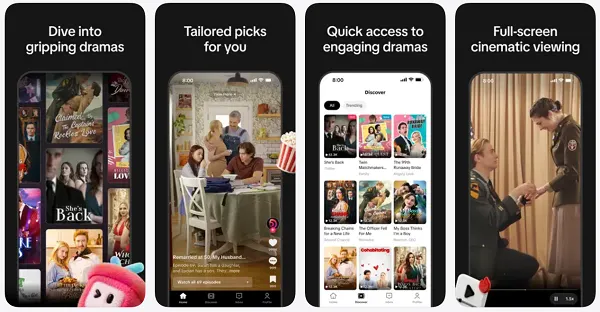
    As highlighted by app researcher Alessandro Paluzzi, Instagram is currently experimenting with its own, dedicated Short Drama element within the app.

    As this example shows, the new element, which is currently in early testing, and is not available to the public as yet, would seemingly enable Instagram users to follow their favorite short drama shows, and stay up to date on the latest episodes more easily.

    Would that be beneficial?

    Well, again, mini dramas are big on TikTok, with one estimate indicating that the format generated $1.3 billion in the US in 2025, mostly via direct payments from viewers.

    And clearly TikTok sees potential. It launched a Minis section in the app last year, while it’s also launched a dedicated mini dramas app, called PineDrama, in the U.S. and Brazil.

  • Instagram may soon let you swap your face for another person in photos and videos made with AI

    Instagram may soon let you swap your face for another person in photos and videos made with AI

    Instagram may soon bring a new feature that would allow users to create their “likeness” using AI. You can think of a likeness as an avatar. While avatars already exist on the platform, likeness might build on them to extend into more extensive photo and video editing. Additionally, it seems users may also be able to swap their likeness with others’, possibly close friends and acquaintances, with permission.

    The feature was reported by tipster Alessandro Paluzzi, who goes by the handle @alex193a on X (formerly Twitter), along with screenshots showing how some part of it could work in future. However, it is important to understand that Instagram hasn’t confirmed this update yet, so you better take this information with a grain of salt.

    Instagram create your likeness with face swap feature: Details leaked

    According to Paluzzi, who is also a reverse engineer, Instagram is working on a feature to let users create AI-likeness and even swap their avatars with likeness of other people in photos and videos. If you want to swap your likeness, you will require permission, the tipster adds. When you request access, the person will be notified and when they approve, you can use their likeness in your photos and videos.

    This consent-based approach may be inspired by OpenAI’s Sora which already has an approval-based system to use other people’s likeness. This is so the platform(s) can keep a check on potential misuse.

  • Instagram and Edits roll out Valentine-themed fonts, stickers, and hidden phrases

    Instagram and Edits roll out Valentine-themed fonts, stickers, and hidden phrases

    If your feed suddenly looks like Cupid discovered kinetic typography, that is by design. Meta Platforms has introduced Instagram Valentine features across Stories, Reels, Notes, and direct messages for Valentine’s Day 2026, adding a mix of themed fonts, animated text effects, sticker frames, interactive “secret phrase” triggers, and a dedicated DM chat look. The rollout is time-limited in parts, which means creators and casual posters alike have a small window to use the newest seasonal touches without needing a third-party editor.

    Alongside the in-app updates, the company’s short-form editing companion, Edits, is also getting Valentine-themed additions, including new text styles and playful sound effects. Unlike the seasonal Instagram layer, several of the Edits upgrades are positioned as longer-term tools that stay available even after the holiday window closes.

    What is new on Instagram for Valentine’s Day 2026

    The update spreads across multiple surfaces so it is not just a “one sticker pack and done” moment. Here is what changes in the main app.

    New fonts and animated text effects for Stories and Reels

    Instagram is adding Valentine-themed fonts and animated text styles that can be applied while building a Story or Reel. The intent is simple: help posts look “occasion-ready” without forcing users to hunt for templates elsewhere. This also lines up with how creators typically work in February, when quick seasonal publishing can outperform overproduced edits.

    Where it shows up

    • Stories text editor
    • Reels text overlays and captions styling

    Valentine sticker frames for photos and selfies

    For people who prefer a clean photo post but still want a themed finish, Instagram is also adding Valentine sticker frames that can wrap around photos and selfies shared in Stories. This can be especially useful for brands and creators who want a festive look while keeping the image itself untouched.

    Story comment secret phrases

    This is the feature designed to reward the curious. Certain phrases typed into Story comments can trigger hidden visual themes and animations. Think of it as a tiny interactive layer that makes the comment section feel less like admin work and more like a mini event.

    Creators may find this useful for engagement prompts, since it nudges followers to comment something specific rather than just dropping a heart emoji and leaving.

    Notes get hint text, themes, and hidden triggers

    Notes are also part of the Valentine rollout, with themed prompts and styling plus hidden phrases that can unlock effects. If you have been using Notes for quick updates, this is one of the easiest places to “go seasonal” with almost zero effort.

    A themed DM looks for light and dark mode

    Instagram is adding an Instagram DM chat theme for Valentine’s Day. It can be enabled as a dedicated chat appearance, and it is available in both light and dark modes. If you manage communities or brand DMs, this is a small touch that can make conversations feel more timely without changing how you actually message.

    What’s new in Edits for Reels creators

    Edits is getting a Valentine’s pass too, but with a more “creator tool” angle than a purely seasonal skin.

    Valentine fonts and text presets

    Edits is adding Edits Valentine fonts, giving creators new text presets designed for quick, themed overlays. If you create short-form content daily, this can shave minutes off each edit, which adds up fast.

    Valentine sound effects

    Edits is also adding themed audio flourishes, including harp-style tones and heartbeat effects. These are lightweight, but that is the point. They are meant to be quick accents for transitions, reveals, and punchlines.

    Speed controls up to 100x

    The headline tool update is Edits 100x speed. Playback speed can be increased up to 100x for exaggerated motion effects, fast-cut montages, or stylised “blink and you’ll miss it” sequences. Used carefully, it can add energy. Used recklessly, it can turn your Reel into a caffeinated slideshow, so restraint is doing the heavy lifting here.

    Availability dates and what stays after Valentine’s week

    Instagram’s Valentine-themed features are available from February 12 through February 16, 2026. After that, the seasonal layer is expected to disappear. The edits, including fonts, sound effects, and the high-speed playback control, are positioned to remain available going forward, so creators can keep using them past the holiday window.

    A practical way to use these without making your content cringe

    If you want to ride the seasonal wave while keeping your feed tasteful, try this approach:

    • Use Reels Valentine text effects for emphasis on one key line, not every line
    • Keep frames subtle, especially on product shots
    • Treat secret phrases as a call-to-action tool, not a gimmick
    • Test speed effects on b-roll, not on faces, unless you want accidental comedy

    Seasonal features like this are low-stakes, high-reward. They give casual users a reason to post, and they give creators a quick engagement hook without demanding a full redesign of their style. The only real risk is doing too much. If your Valentine post needs five effects to feel romantic, the content might be the part that needs the upgrade.